The Legacy-GL FP&A Integration Scorecard
FREE WORKING TOOL · GOOGLE SHEET
See what your monthly close actually costs on a legacy GL. Get a break-even price you can hold every FP&A quote against.
Score any vendor on 23 questions built to catch the "we integrate with everything" answer. About 20 minutes. Nothing sent to us. Your own working copy, opens in Google Sheets, formulas preserved.
Built by Centage's VP Finance, Jandir Matos. Based on published mid-market close benchmarks. Sourced and cited on the last tab.
What the scorecard computes
Nine tabs. Each one produces a number, a verdict, or a table the reader could not have produced in ten minutes themselves.
Tab 1 · Days to close, against a published benchmark
Top quartile is 5 to 7 days. Median band is 8 to 14. Enter your period-end and pack-out dates. Get a marker on the strip and a plain-English read of your band.
Tab 2 · Hours-bound vs calendar-bound verdict
Most Controllers have never made this call explicitly. Compute the implied days from your close hours and your close team's headcount, compare to your actual days, and get one of three verdicts. Working late will not shorten a calendar-bound close. Adding people will not shorten one either. The verdict is worth the download on its own.
Tab 3 · Cost of the manual close, by task and by role
Twenty close tasks, each costed at the loaded hourly of the role that does it (not a blended average that a Controller will notice is wrong). Fully-loaded rate build defaults to Controller $80/h, FP&A $66/h, Staff Accountant $49/h. The default profile lands near $79,300 a year at three legal entities.
Tab 4 · Break-even annual price for any FP&A tool
The single design decision that keeps this file from being a brochure. The sheet does not contain Centage's price anywhere in the arithmetic. It computes the annual price at which any tool would pay for itself against your hours, so you can hold every quote you get, from anyone, against your own number. At the default three-entity profile it lands near $20,650 for 12-month payback and $22,200 for 24-month. If your break-even comes out below the quotes you are seeing, the sheet says that out loud.
Tab 5 · GL Reality Check for 23 ledgers
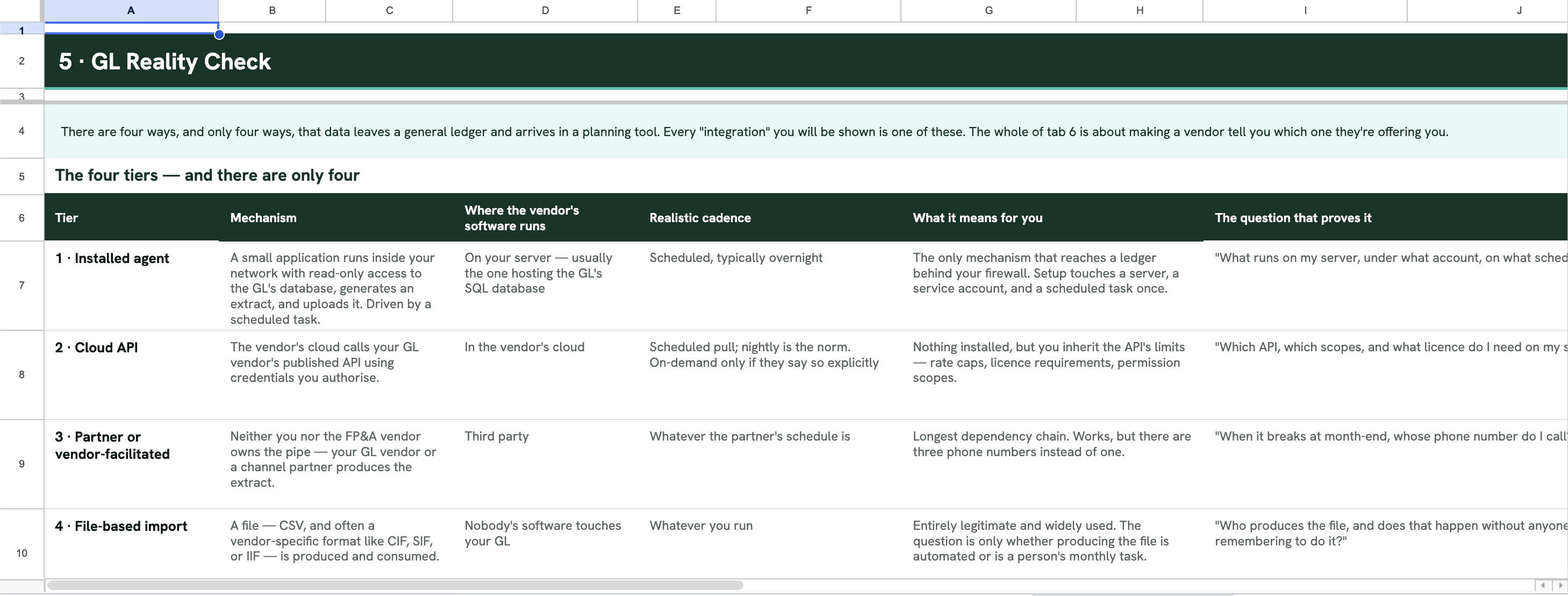
Dynamics GP, SL, NAV, AX, and Business Central. Sage 100, 300, 500, and Intacct. Blackbaud Financial Edge NXT. MIP Fund Accounting. SYSPRO, Multiview, Epicor, Deltek, Elite, PeopleSoft, Acumatica, NetSuite, Xero, QuickBooks Desktop, QuickBooks Online, and Emphasys. For each: deployment, documented API surface, the architecturally available integration tier (installed agent, cloud API, partner-facilitated, or file-based), realistic cadence, known frictions, and the exact question to ask any FP&A vendor about your specific ledger.
Tab 6 · Vendor Interrogation
Twenty-three weighted questions with the mechanical reason each matters, what a good answer sounds like, what an evasive answer sounds like, and an auto-fail rule a raw total would hide. Scores three vendors side by side. Publish a scoring rubric you could yourself fail. That is the trust.
Tab 7 · Reference-call script
Twelve questions to ask the vendor's customer who runs your ledger, plus a reference-qualification block. No vendor gives buyers this.
Tab 8 · Continuity and migration readiness
Fourteen-asset exposure score plus an eighteen-item cutover checklist. Useful whether you ever migrate, and whichever vendor you pick. If you never change your GL, the score reads that back to you and the tab moves on.
Tab 9 · Close log
Twenty-four periods of close history with rolling averages and a trend sparkline. This is the tab that keeps the file open next March.
Preview: Tab 5 · The GL Reality Check
A short excerpt of what tab 5 looks like inside the sheet. Six ledgers, four columns. The sheet itself carries 23 ledgers and eleven columns per row.
Dynamics GP (Great Plains). On-premises, MSSQL. Tier 1, Installed agent. The one question to ask: "GP puts each company in its own database. What does your setup look like for four companies, and is that one job or four?"
Sage 100. On-premises. Tier 1, Installed agent. The one question to ask: "Which Sage 100 edition and data layer are you quoting against? Say it back to me."
Blackbaud Financial Edge NXT. Vendor cloud. Tier 2, Cloud API. The one question to ask: "Are you listed in Blackbaud's marketplace? Send me the listing."
MIP Fund Accounting. On-premises or partner-hosted. Tier 1 if you own the server; Tier 3 if partner-hosted. The one question to ask: "Is my MIP hosted? If so, who produces the extract, on what schedule, and what do they charge?"
QuickBooks Desktop. On-premises, proprietary file. Tier 1, with caveats. The one question to ask: "Does your scheduled pull actually run unattended against QuickBooks Desktop, or do your customers run it by hand? Ask them, not me."
SYSPRO. On-premises, MSSQL. Tier 1, Installed agent. The one question to ask: "Does the extract run unattended, or does someone have to be logged in?"
Column L in the sheet is your correction column. Our read as of August 2026. Version and deployment change the answer. If your VAR tells you different, write it there. It is your file.
The 20-minute pass
If you have never opened a file like this, start on tab 2. Fill the mint cells. Ignore the grey ones. Work left to right. Every downstream tab is live the moment you save tab 2. Twenty minutes will get you numbers on every tab except the vendor-interrogation matrix, which you fill in only when you have vendors to score.
Yours to keep.
Every formula in the workbook was reviewed by a healthcare-fluent VP of Finance. Works in Google Sheets and Excel. No sales call to unlock the file. If you want to talk about what your break-even means for next year, we are one click away when you are ready.
Get the Scorecard
Enter your name, work email, company, and which GL you run. Your own working copy opens in Google Sheets, formulas preserved. Comes back to you as a /copy link and an email.
Instant download link. Also emailed.
Keep reading...
Interviews, tips, guides, industry best practices, and news.

Cash flow forecasting for mid-market CFOs: the driver architecture that holds up across healthcare, nonprofit, manufacturing, distribution, and professional services